Find and Understand Samples
Use this page when you need to find an existing sample without changing it. You can start with a barcode, sample ID, subject, Lab Project, tag, sample type, collection date, box, or freezer.
This is a read-only task. Finding and viewing a sample does not require approval and does not change the record.
Before you start
Section titled “Before you start”You need:
- Culsma PAWS connected and enabled in your AI Agent;
- the intended workspace selected in Culsma PAWS; and
- at least one known detail about the sample or group of samples.
Use the most specific detail you know. An exact barcode normally gives a more reliable result than a broad description.
Start in your AI Agent
Section titled “Start in your AI Agent”Replace the placeholder with a real barcode and copy this request into your AI Agent:
Use Culsma PAWS to find sample [SAMPLE BARCODE]. Show its sample identity, subject and Lab Project context, tags, sampling time, and complete recorded storage location. Do not change any data.The AI Agent should:
- use your authenticated active workspace;
- search for the exact barcode before trying broader text matching;
- fetch the selected sample and only the related context needed for the answer;
- resolve the recorded box and freezer location when available; and
- tell you when information is missing, ambiguous, or incomplete.
If several samples could match, the AI Agent should show a short candidate list and ask one focused question. Add another known detail instead of asking it to guess.
Review the result
Section titled “Review the result”A useful result should make the identity and evidence easy to check.
| Result | What to check |
|---|---|
| Sample identity | Barcode or displayed Sample ID and the matching evidence. |
| Biological context | Subject and sampling time, when recorded. |
| Project context | The related Lab Project and relevant tags. |
| Storage | Box or portable storage, sample position, freezer, and freezer slot when recorded. |
| Completeness | Missing relations, omitted results, or a search limit should be stated explicitly. |
Unassigned means Culsma PAWS explicitly reports that the sample has no assigned storage position. Unknown means there is not enough recorded evidence to determine that part of the location. Do not treat these results as equivalent.
Optional: Find or confirm the sample in Web/App
Section titled “Optional: Find or confirm the sample in Web/App”Use this optional path when you know a value supported by the Samples search screen. You can also use it to confirm a result returned by the AI Agent.
- Open the Culsma PAWS web or app interface and confirm the active workspace.
- Open Samples from the main menu.
- Select the search field that matches what you know:
- Barcode;
- ID;
- Type;
- SubjectID;
- StorageID; or
- Tags.
- Enter or select the value and use the search icon.
- Open the matching sample.
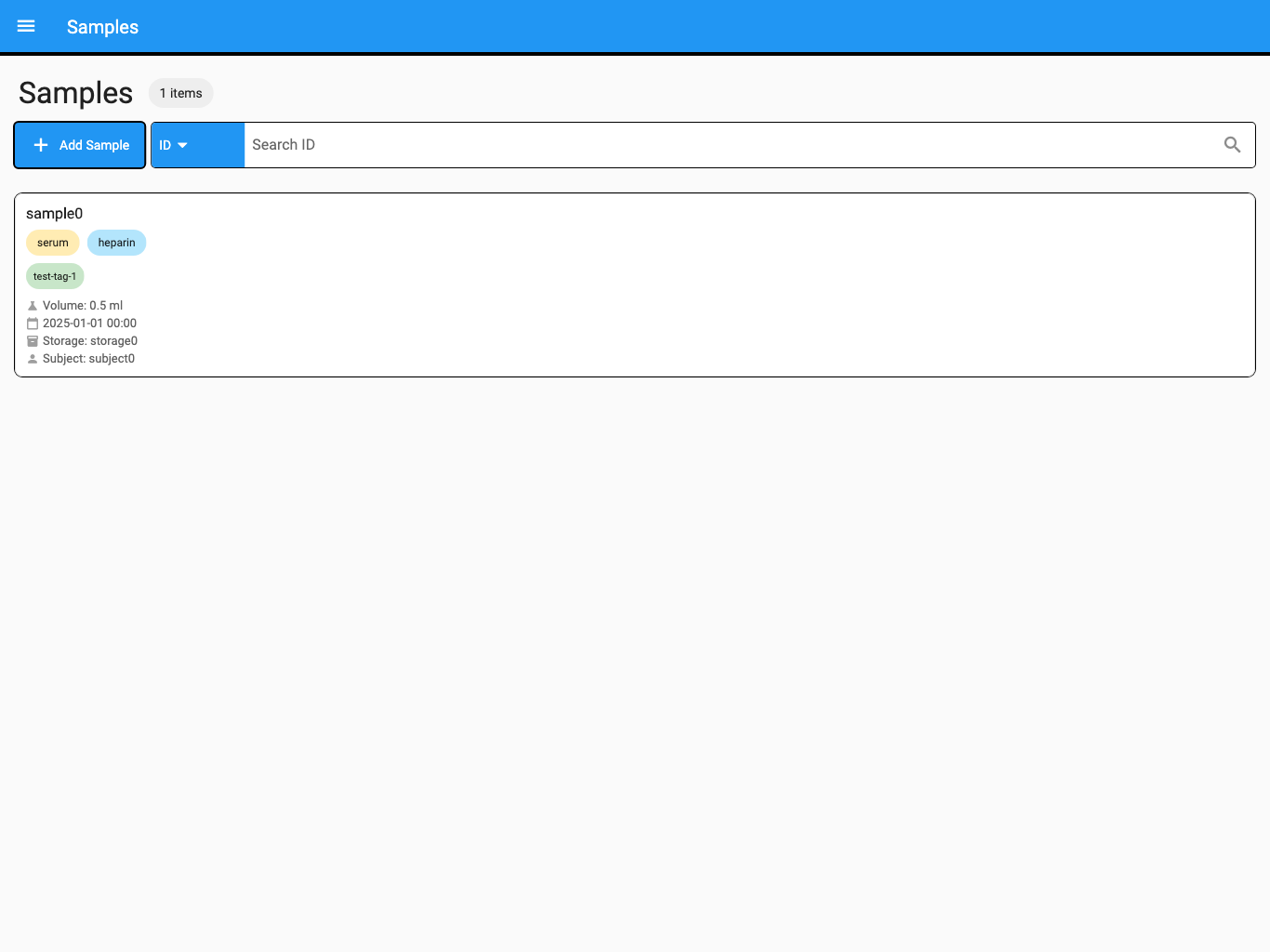
The screenshot uses synthetic test data.
- Review its Sample ID, Sample Type, Sampling Date, Subject, Project, Tags, and Storage values as available.
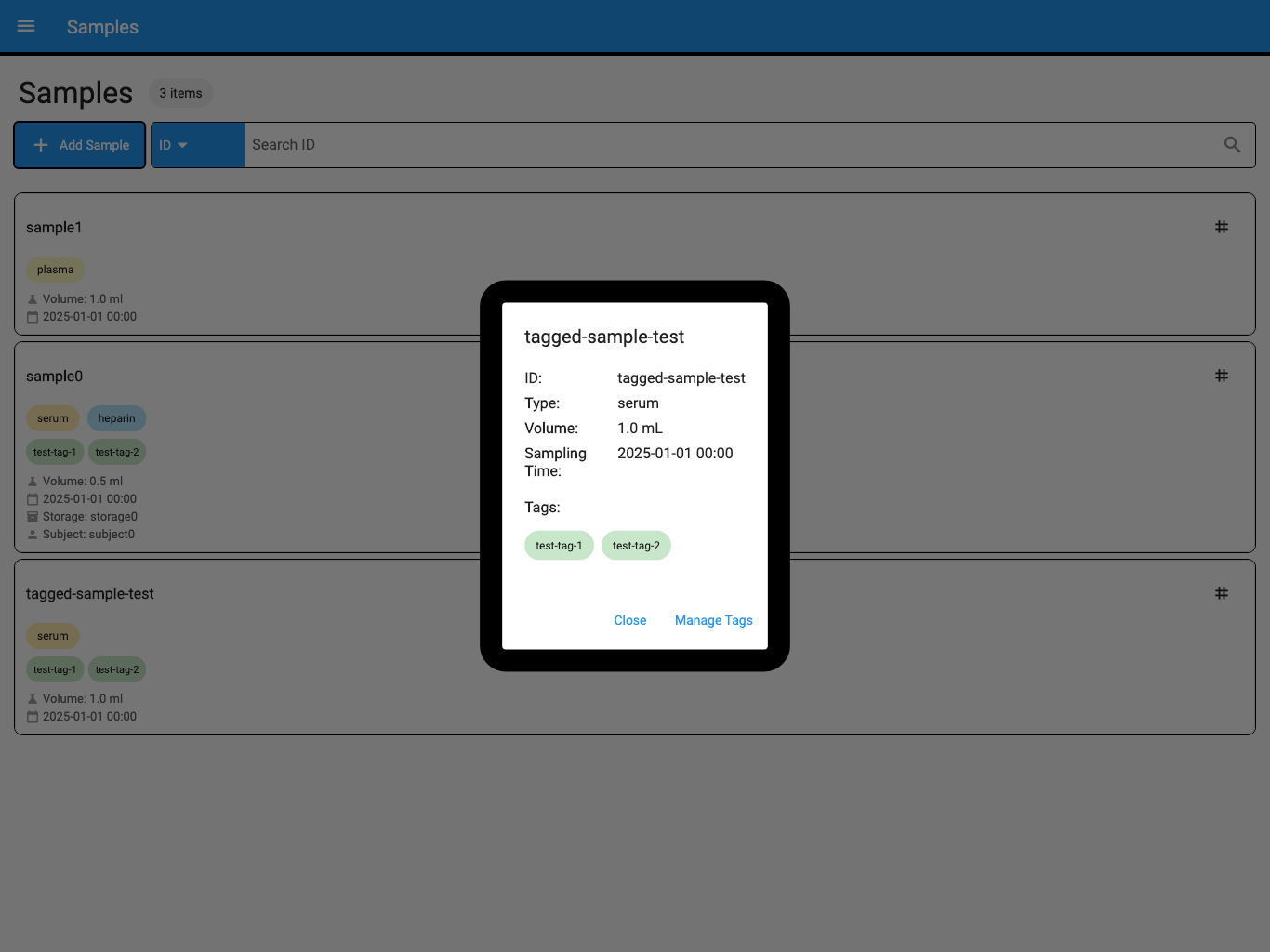
The screenshot uses synthetic test data.
The Web/App search is useful for a known identifier or one visible field. Use the AI Agent when the request combines several conditions, uses a date range, asks for related biological context, or needs a complete box-to-freezer location chain.
Find a Subject by Social ID in Web/App
Section titled “Find a Subject by Social ID in Web/App”Use the Subjects screen when you know a person’s complete Social ID and need to find the related Subject. Social IDs are encrypted and should not be pasted into an AI conversation.
Before using this search, confirm that:
- your Workspace role is Workspace Owner, Admin, or Editor;
- the current device is registered and authorized for the active Workspace; and
- the required Workspace encryption key has been delivered to this device.
To search:
- Open Subjects from the main menu.
- Confirm the active Workspace.
- Under Project, select All or the specific Lab Project you want to search.
- Open the search-field dropdown and select socialId.
- Enter the complete Social ID and select the search icon.
- Open the matching Subject and confirm its displayed Subject ID and context.
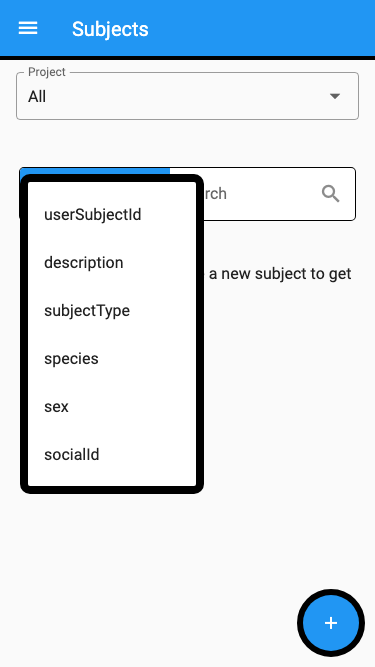
The screenshot uses synthetic test data.
Social ID search uses an exact match. Leading and trailing spaces and letter case do not affect the match. Other formatting is preserved, so AB-123 and AB123 are different values. A partial Social ID does not match.
The socialId option is hidden from Viewers and from devices that are not authorized or do not have the required encryption key. Ordinary Subject searches such as userSubjectId, description, subjectType, species, and sex remain available. The internal record ID is not shown as a search choice.
If the Subject was encrypted with an older key version that is not present on the device, its Social ID cannot be displayed or matched. Ask a Workspace Owner or encryption administrator to check device authorization and key delivery. If the device is revoked while the page is open, the next Social ID search is denied and the existing Social ID results are cleared.
More requests to try
Section titled “More requests to try”Find samples in the PAWS project tagged for follow-up. Show the filters used and tell me if the result is incomplete.
Find samples for subject SUB-104 collected during May 2026. Group the matches by sample type and do not change anything.
Find samples in this workspace that do not have an assigned storage location. Distinguish Unassigned from Unknown.
Show the samples recorded in box PBMC-04, including each barcode and position. Tell me which freezer and slot contain the box.
If the result is not clear
Section titled “If the result is not clear”| What you see | What to do |
|---|---|
| No sample matches | Check the barcode or filter, confirm the active workspace, and ask whether the sample is visible to your role. |
| socialId is missing from the Subjects search menu | Confirm your Workspace role, current-device authorization, and encryption-key delivery. Viewers cannot use Social ID search. |
| A complete Social ID does not match | Confirm the active Workspace and Project filter, preserve the identifier’s formatting, and ask whether the required historical encryption key is available on the device. |
| Several samples match | Add a subject, project, sample type, date, tag, or storage detail. |
| The location is Unassigned | Confirm whether the sample is intentionally awaiting placement. |
| Part of the location is Unknown | Check the sample or box in Web/App and ask the workspace owner whether the missing relationship has been recorded. |
| The result may be incomplete | Ask the AI Agent to state the result limit and continue through the remaining results when appropriate. |
| AI and Web/App disagree | Confirm the exact sample identity and refresh both views before relying on the location. |
You have completed the task when the correct sample or sample set is identified, the available context is grounded in Culsma PAWS, and any missing or incomplete information is clearly stated.
To change sample information, continue to Update Samples and Tags. For physical storage work, see Manage Freezers and Racks or Manage Boxes, Samples, and Labels.