Update Samples and Tags
Use this page when an existing sample needs a supported metadata correction or a tag change. Start in your AI Agent when you want Culsma PAWS to identify the record, prepare a reviewable change, and verify the result.
This is a write task. The AI Agent may prepare a preview, but it must not apply the change until you explicitly approve that exact change set.
Before you start
Section titled “Before you start”You need:
- Culsma PAWS connected and enabled in your AI Agent with
lab.writeaccess; - a workspace role that permits the change;
- the intended workspace and environment confirmed; and
- an exact sample identifier plus the intended final value.
Use a barcode or displayed Sample ID whenever possible. If the sample or tag is ambiguous, resolve it before asking for a preview.
Start in your AI Agent
Section titled “Start in your AI Agent”Replace the placeholders and copy this request into your AI Agent:
Use Culsma PAWS to add the existing tag [TAG NAME] to sample [SAMPLE BARCODE]. Find the exact sample and tag first. Prepare a preview only, show the complete change set, and stop for my approval. Do not commit any change until I explicitly approve that exact change set.The AI Agent should:
- state the selected environment and authenticated workspace;
- find the exact sample and resolve the existing tag;
- prepare a governed preview without changing the sample;
- show the normalized difference, warnings, target, and expiry;
- stop in awaiting approval state; and
- commit or cancel only the exact change set you identify.
For a production change, the preview should be clearly labeled PRODUCTION.
Review and decide
Section titled “Review and decide”Before approving, check every part of the preview.
| Preview item | What to check |
|---|---|
| Environment and workspace | The change is aimed at the intended Culsma PAWS environment and workspace. |
| Target | The canonical sample identifier and displayed barcode match the intended sample. |
| Difference | Every before and after value is correct; no unrelated field or tag changes. |
| Warnings | Validation, conflict, permission, or incomplete-resolution warnings are understood. |
| Expiry | The change set is still current and has not expired. |
| Scope | All affected samples are listed; unchanged or no-op values are identified. |
To apply the reviewed change, reply with an approval that identifies the exact change set:
I approve the exact PRODUCTION change set [CHANGE SET ID] shown above. Commit it, then fetch the affected sample again and verify the final value.To discard it instead:
Cancel change set [CHANGE SET ID]. Do not apply it.Approval is valid only for the unchanged, unexpired change set you reviewed. If the preview changes, expires, or encounters a conflict, ask for a new preview.
Supported changes
Section titled “Supported changes”The AI workflow supports ordinary sample fields such as sample type, Lab Project, sampling time, volume, subject, portable storage, note, order number, and supported custom properties. Tag additions and removals use a separate tag-change preview.
The sample identity, displayed barcode, workspace, creator, and creation time cannot be changed through this workflow. Custom properties are replaced as one object, so review the complete resulting object rather than only the property you mentioned.
Sample deletion is outside this normal correction workflow. Do not combine a deletion request with a metadata or tag correction.
Optional: Update a sample in Web/App
Section titled “Optional: Update a sample in Web/App”Use the Web/App path for a simple change to one sample when you want to edit the visible form directly. Web/App saves are applied directly; they do not use the MCP preview-and-approval boundary described above.
- Open Culsma PAWS and confirm the active workspace.
- Open Samples and find the exact sample.
- Open the sample and select its edit action.
- Change only the intended fields. The displayed sample ID cannot be changed after creation.
- Recheck the values and select Save.
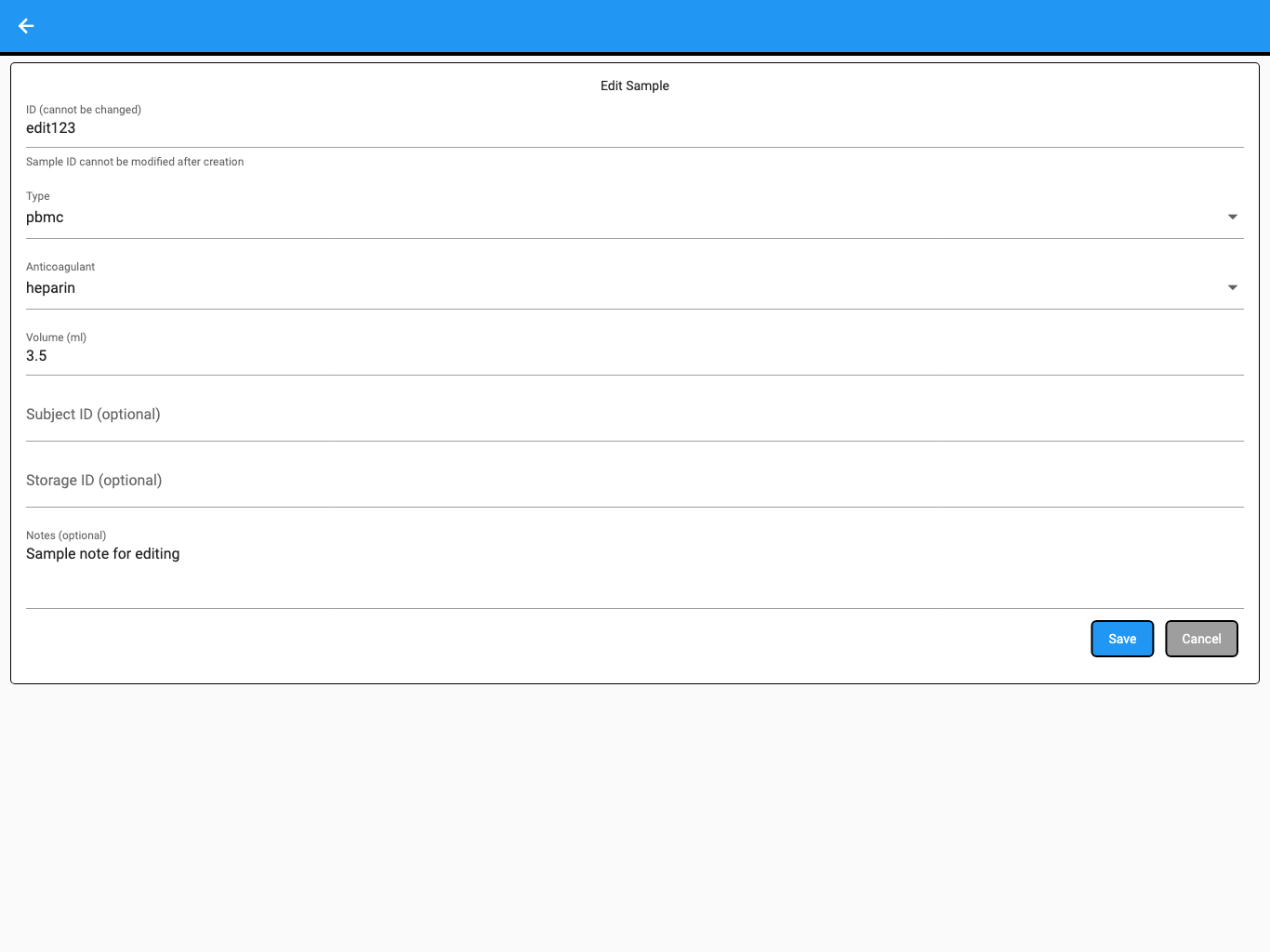
The screenshot uses synthetic test data.
To change tags, open the sample details, select Manage Tags, add or remove the intended existing tags, and select Apply Tags. Return to the sample list and confirm the final tag chips.
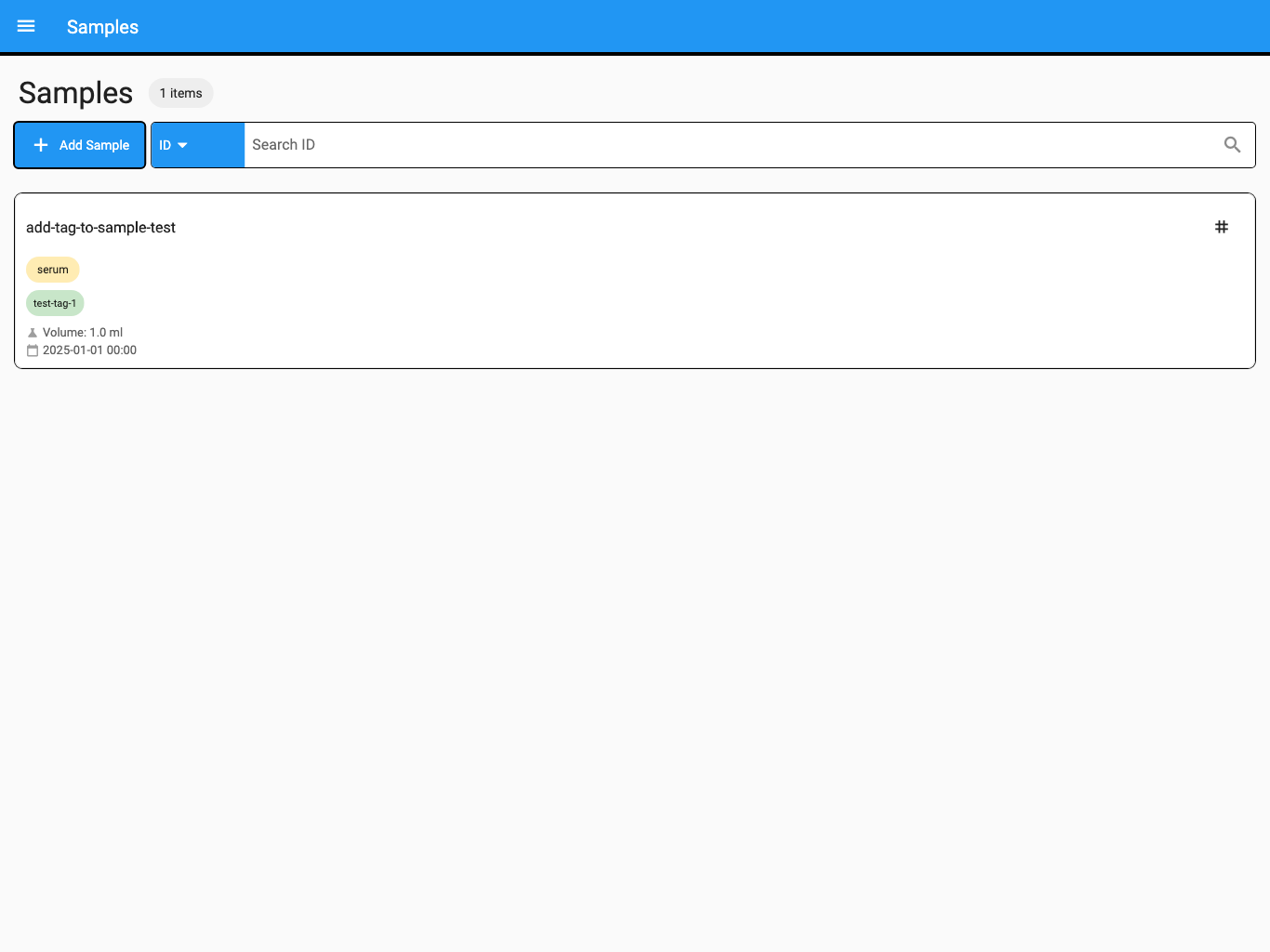
The screenshot uses synthetic test data.
Use the AI Agent when the request affects several samples, combines field and tag conditions, or needs a durable preview and verification trail.
More requests to try
Section titled “More requests to try”Change the note for sample PAWS-001 to “Second aliquot received”. Do not change any other field. Preview the change and wait for my approval.
Remove the existing tag Ready for analysis from samples PAWS-011 and PAWS-012. Show every affected sample in one preview and stop before commit.
Move sample PAWS-021 to portable storage PBMC-04. Resolve both records, preview the exact relationship change, and wait for approval.
Cancel the pending change set [CHANGE SET ID]. Do not create a replacement.
If the change cannot continue
Section titled “If the change cannot continue”| What you see | What to do |
|---|---|
| Several samples or tags match | Add a barcode, canonical identifier, project, or another known detail. Do not approve an ambiguous target. |
| No effective changes | Confirm that the record already contains the intended value; no commit is needed. |
| Permission denied | Confirm lab.write access and ask a workspace owner to check your role. |
| The change set expired | Ask the AI Agent to fetch the current record and prepare a new preview. |
| The record changed after preview | Review a newly generated preview; do not retry the stale change set. |
| The commit partially failed | Do not repeat the whole request blindly. Review the reported successful and failed targets and the recovery evidence. |
| Web/App saved the wrong value | Reopen the exact sample, confirm its current state, and prepare a narrowly scoped correction. |
You have completed the task when the intended change set is committed or cancelled, the affected sample is fetched again, and the final recorded values are verified.
For spreadsheet-based intake, continue to Import Samples. To review governed proposals in more detail, see Review and Approve Changes.